
You hit send. Two seconds later it is in someone’s inbox on another continent. Between those two moments, your message gets handed between at least four separate systems, triggers a handful of DNS lookups, opens an encrypted connection to a server your computer has never spoken to before, and passes three independent authentication checks. Any one of them can quietly drop it. Most people never see any of this, which is fine right up until something breaks. Then you are staring at a bounce message full of numbers and hostnames with no idea which part failed.
So here is the whole trip, step by step:
The Short Version
Your mail client hands the message to your provider’s submission server over SMTP. That server looks up the recipient domain’s MX records in DNS to find out which server accepts mail for it. It opens an SMTP connection to that server, usually wrapped in TLS, and transfers the message. The receiving side runs SPF, DKIM and DMARC checks, filters for spam, and files the message into a mailbox. Your recipient’s client then pulls it down over IMAP.
Four systems, one protocol doing the moving, DNS doing the navigating. Now the details.
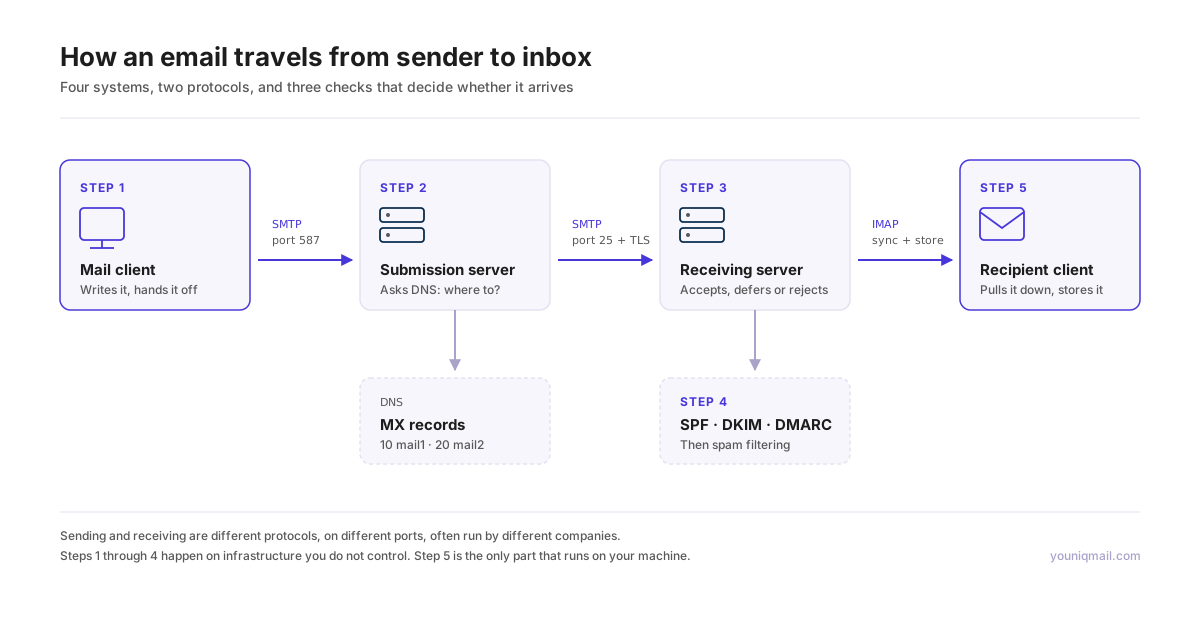
Step 1: Your Client Hands It Off
Your mail client is what the standards call a Mail User Agent. It does not deliver anything. It writes the message and hands it to a server that knows how to move mail.
That handoff is SMTP, the Simple Mail Transfer Protocol, defined in RFC 5321 and going all the way back to RFC 821 from 1982. Yes, 1982. The protocol carrying your email predates the web by seven years.
The conversation is plain text and almost readable. Your client says EHLO to introduce itself, the server lists what it supports, your client authenticates, then MAIL FROM, RCPT TO, DATA, and the message body goes across. QUIT ends it.
One detail worth knowing: this happens on port 587, the submission port, not port 25. Port 25 is for servers talking to each other. Port 587 is for you talking to your provider, and it requires authentication. That separation is why your ISP can block port 25 outbound without breaking your ability to send mail.
There is also a distinction here that causes endless confusion later. The MAIL FROM address in the SMTP conversation is the envelope sender. The From: header inside the message is what your recipient sees. They do not have to match. That mismatch is the entire foundation of the authentication story further down.
Step 2: DNS Finds the Destination
Your provider’s server now has a message for someone at example.com. It has no idea where that is.
So it asks DNS for the MX records of example.com. MX stands for Mail Exchanger, and the answer comes back as a list of hostnames with priority numbers.
example.com.  MX  10 mail1.example.com.
example.com.  MX  20 mail2.example.com.
Lower number wins. The sending server tries priority 10 first, and only falls back to 20 if the first one refuses to answer. This is why mail keeps flowing when a mail server goes down, assuming somebody configured a backup.
If a domain publishes no MX records at all, the sending server falls back to the A record and tries the domain itself. And if a domain wants to say explicitly that it accepts no mail, there is a null MX convention for exactly that, a single record pointing nowhere.
Each MX hostname then needs its own lookup to resolve to an actual IP address. Only now does the sending server know where to open a connection.

Step 3: Server to Server Transfer
Two Mail Transfer Agents now talk to each other on port 25. Same SMTP commands as before, same 1982 vocabulary, but no authentication, because the receiving server has no relationship with the sender and no way to verify a password.
That lack of authentication is the original sin of email. Anyone can open a connection to any mail server and claim to be anyone. Everything built since is an attempt to patch that hole from the outside.
The connection itself is usually encrypted these days. STARTTLS upgrades the plain connection to TLS mid conversation, though it is opportunistic by design, meaning an attacker who can strip the STARTTLS advertisement can force it back to plaintext. MTA-STS, specified in RFC 8461, exists to close that gap. A domain publishes a policy saying it can receive mail over TLS and that senders should refuse to deliver to servers that do not offer a valid certificate. DANE does something similar using DNSSEC.
If the receiving server is busy, or greylisting, or just does not feel like it, it can reply with a 4xx code meaning try again later. The sending server queues the message and retries, often for several days, with growing gaps between attempts. A 5xx code means permanent failure and generates a bounce.
This is where the “sent instantly” illusion breaks down. Most mail is instant. Some of it sits in a retry queue for hours and nobody tells the sender.
Step 4: The Receiving Server Decides Whether to Trust It
The message has arrived. Now comes the part that determines whether it reaches an inbox, a spam folder, or nothing at all.
Three checks run, and they check different things.
SPF asks whether the sending server was allowed to send for this domain. The domain publishes a DNS record listing authorized senders, and the receiver compares it against the IP that actually connected. Note what SPF validates: the envelope sender from the SMTP conversation, not the From: header your recipient sees.
DKIM asks whether the message was altered in transit. The sending domain signs selected headers and the body with a private key, and publishes the public key in DNS. The receiver recomputes the signature. Any modification breaks it.
DMARC ties the first two to the address the human actually reads. It requires that SPF or DKIM not only pass, but pass for a domain that aligns with the visible From: header. That alignment requirement is the whole point, and it is what makes DMARC the piece that actually stops spoofing. It also tells receivers what to do on failure, whether to accept, quarantine or reject, and where to send reports.
After authentication comes content filtering, reputation scoring on the sending IP and domain, and whatever machine learning the provider runs. A message can pass all three authentication checks and still land in spam. Authentication proves the sender is who they claim. It says nothing about whether the mail is wanted.

Step 5: Into the Mailbox, Then Onto the Device
The message is written to storage on the receiving server. On the provider side it is typically encrypted at rest, though with keys the provider holds, which is how they index and search your mail.
The final hop is retrieval, and this is a completely different protocol. IMAP, currently specified as IMAP4rev2 in RFC 9051 which replaced the long serving RFC 3501, keeps the messages on the server and syncs state, so flags and folders match across every device. POP3 downloads and traditionally deletes, which is why it has mostly faded outside of specific workflows.
This step is the one people forget is separate. Sending and receiving are not the same protocol, not the same server, and frequently not even the same company.
Reading the Trail Afterwards
Every server that touches a message stamps a Received header on top. They stack in reverse order, so the oldest is at the bottom and the most recent is first.
Open any message, view the source, and read those headers from the bottom up. That is the actual route your mail took, with timestamps at every hop. When a message takes six hours to arrive, this is where you find out which server sat on it.
The timestamps come from each server’s own clock, so they can disagree, sometimes wildly. And every header can be forged except the ones added by servers you actually trust. Read them from the top down, trusting only as far as the first server you control.
Why Any of This Matters
Email is not one system. It is a chain of independent systems with no central coordinator, held together by conventions, most of them older than the people relying on them. That design is why email survived every walled garden that tried to replace it. Nobody owns it. Any domain can talk to any other domain without permission from a platform. Your address is not a username on someone’s service, at least not architecturally.
It also explains where the failures live. Mail vanishing usually means DNS or authentication. Slow mail means retry queues. Mail in spam means reputation, not delivery. Knowing which system to look at saves hours.
And it explains why the client on your desk matters more than people assume. Everything up to Step 5 happens on infrastructure you do not control. The last hop, the copy that ends up on your machine, is the one part of the chain where you get to decide how your mail is stored and who can read it. That is the part YouniqMail is built around.
Frequently Asked Questions
How long does an email take to arrive?
Usually a few seconds. The transfer itself is fast, and most of the elapsed time goes into DNS lookups and spam filtering. Delays of minutes or hours almost always mean the receiving server issued a temporary rejection and the sender is retrying on a backoff schedule. Sending servers commonly keep retrying for up to several days before giving up and bouncing.
What is an MX record and do I need one?
An MX record is the DNS entry that tells other servers where to deliver mail for your domain. If you want to receive email at your domain, yes, you need at least one. Multiple records with different priority numbers give you failover, with the lowest number tried first.
What is the difference between SMTP, IMAP and POP3?
SMTP moves mail. It handles submission from your client and transfer between servers. IMAP and POP3 retrieve mail that has already arrived. IMAP keeps messages on the server and synchronizes state across devices. POP3 downloads them, traditionally removing them from the server. Sending and receiving are separate protocols with separate ports and often separate servers.
Why did my email go to spam even though it was legitimate?
Authentication and filtering are different things. A message can pass SPF, DKIM and DMARC and still be filtered, because passing those only proves the sender is who they claim to be. Placement also depends on the reputation of the sending IP and domain, content patterns, how recipients have engaged with similar mail, and provider specific scoring.
Is email encrypted while it travels?
Usually the connections are, but not always and not end to end. STARTTLS encrypts most server to server hops, though it is opportunistic and can be stripped unless the domain enforces it with MTA-STS or DANE. Even then, each server decrypts the message to process it before re encrypting for the next hop. Only end to end encryption such as PGP or S/MIME keeps content unreadable to the servers in between.
Can I see the path an email took?
Yes. View the message source and read the Received headers, which stack with the most recent at the top. Reading them from the bottom up shows the route in order, with a timestamp at each hop. Trust them only from the top down as far as the first server you control, since anything below that can be forged.
What is the difference between the envelope sender and the From address?
The envelope sender is the address given in the MAIL FROM command during the SMTP conversation, and it is where bounces go. The From: header is inside the message and is what the recipient sees. They can differ, which is normal for mailing lists and forwarding, but it is also how spoofing works. SPF validates the envelope sender, while DMARC requires alignment with the visible From: header.