
An email client built around your workflow
YouniqMail keeps your mail on your computer and talks straight to your email provider. Everything else on this page is built on top of that.
What makes YouniqMail different?
Four things shape every feature in the app. If one of them matters to you, YouniqMail is worth a try.
No servers between you and your mail
Many email apps sync your mail through a cloud of their own. YouniqMail doesn’t have one. The app connects straight from your computer to your email provider and keeps your mail in a local database.
Shaped around how you work
No workflow is forced on you. Pick the tools that fit and ignore the rest.
- Dashboard with 18+ widgets
- Tags, colored flags and notes
- Rules, automations and shortcuts
Protection that runs on your device
Encryption, signature checks and phishing warnings all happen on your computer.
- OpenPGP with Autocrypt
- S/MIME with X.509 certificates
- Phishing and spoofing warnings
Works with almost every email account
Gmail, Outlook, iCloud, your own domain or a self-hosted server. If it speaks IMAP and SMTP, YouniqMail works with it. For 29 providers, the setup wizard already knows the server settings.
How does YouniqMail protect your privacy?
Your mail travels from your provider to your computer. That’s the whole route. Encryption, signature checks and phishing warnings happen locally too.
OpenPGP, built in
Create a new key pair or import the one you already have. Find your contacts’ keys on public keyservers, or import them straight from an attachment.
Autocrypt exchanges keys automatically with compatible clients, even in encrypted group conversations. Incoming signatures are verified as soon as you open an email.
S/MIME for work email
S/MIME is the standard used by Outlook, Apple Mail and most corporate mail systems. Import your certificate as .p12/.pfx or straight from your system keychain.
Certificates from signed emails you receive are collected automatically. Every signature is verified locally.
Warnings that tell you what's wrong
Spoofed senders. Misleading links. Lookalike domains. Dangerous attachments. Failed SPF, DKIM or DMARC checks.
YouniqMail checks for all of it when you open an email and shows a clear warning about what looks suspicious. Risky links ask before they open.
Block senders, domains or patterns
One address with a click. A whole domain. Or any address that contains, starts or ends with a certain text.
New emails from blocked senders go straight to Junk or Trash. If you like, their existing emails are cleared out of every folder the moment you block them.
More privacy and security features
Image blocking
Block remote images, the most common way senders track when you open an email.
Link preview on hover
See where a link really leads before you click it.
Risky attachment check
YouniqMail asks before opening attachments that could be dangerous.
BIMI brand logos
Verified brand logos (VMC/CMC) next to senders that use BIMI.
Master password
Lock the app window with a master password and automatic lock.
Encrypted local database
Optional encryption for the mail database on your computer.
Safe credential storage
Account passwords are stored encrypted in your operating system's secure storage.
Private notes
Notes you add to emails are only visible to you.
How do you organize email your way?
Everyone handles email differently. So YouniqMail gives you building blocks instead of one fixed system.
Your inbox at a glance
18+ widgets, 4 presets and a drag-and-drop layout. Put the numbers that matter to you front and center and leave out everything else.
A full tag system
Create tags with your own names and colors and assign them to emails. A second layer of organization on top of folders.
Colored flags, compatible with Apple Mail
Flags work like the ones in Apple Mail and are compatible with Spark’s (orange) pinned feature. Coming from either app? Your system stays the same.
Rules that sort mail for you
Choose from a long list of conditions and actions. Create a rule from an email with a right-click and apply it to the emails already in a folder.
Rules can also call webhooks, use integrations or run your own shell scripts.
Private notes on emails
Add a note to any email. Emails with notes get an icon and show up in their own grouped mailbox. Only you can see them.
Snooze it for later
Pick a preset date and time or set your own. Decide whether you want a notification when the email comes back.
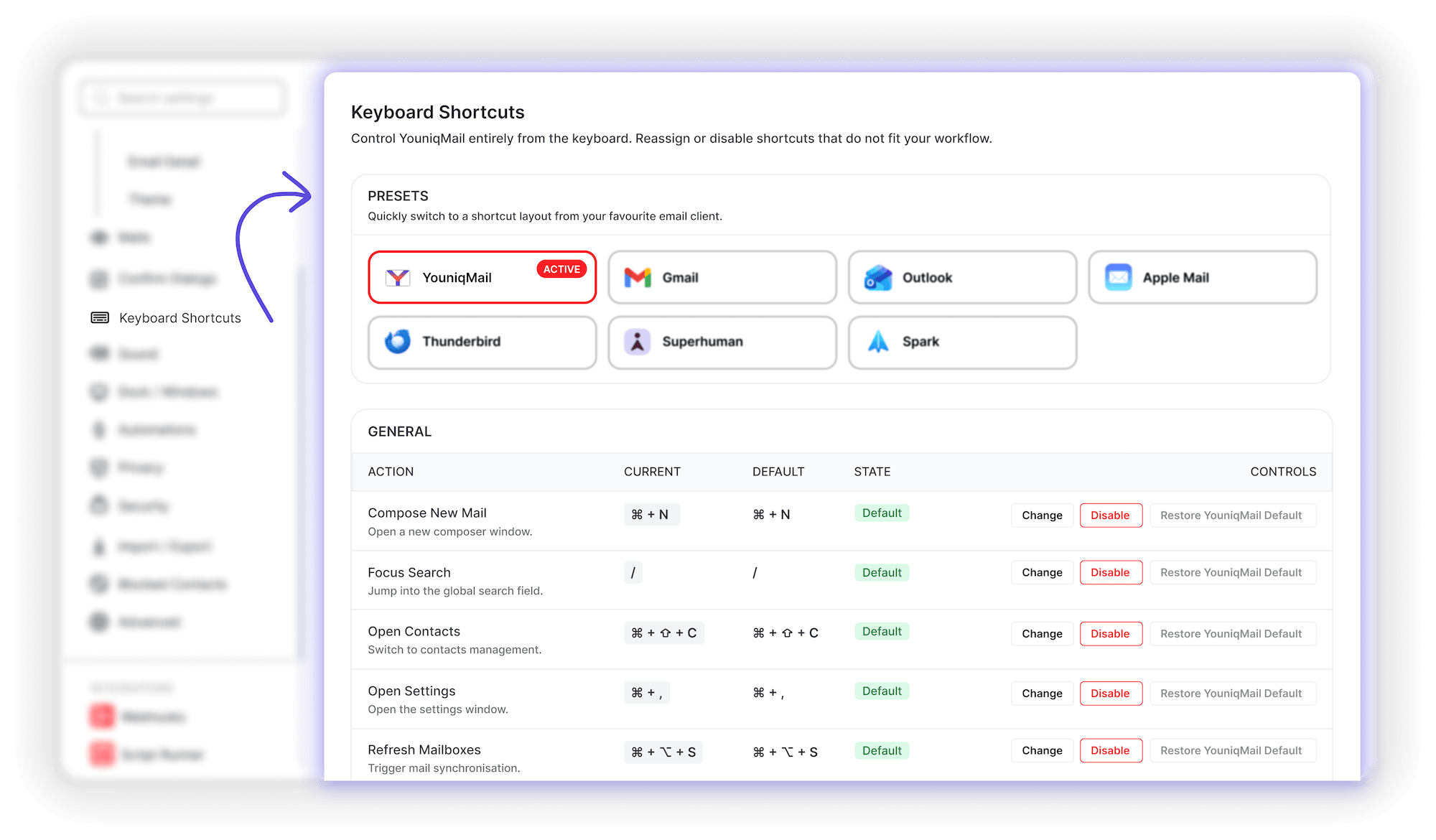
Keyboard first, if you like
Configurable shortcuts with presets from other email clients. Switching from another app doesn’t mean relearning everything.
More ways to stay organized
Smart folders
Saved searches that update themselves.
Pin emails
Keep important emails at the top of the list.
Newsletter management
Manage newsletters and unsubscribe with one click.
Combined mailboxes
All Inboxes, All Sent and more across every account.
Local folders
Keep emails on your computer only, attachments included.
Undo almost anything
Archive, delete, move or flag by mistake? Cmd/Ctrl+Z.
Do Not Disturb
Pause notifications when you need to focus.
Drag & drop
Move emails and reorder mailboxes and accounts.
What helps you write better emails?
Small checks before you hit Send. They catch the mistakes everyone makes at least once.
Know who you're writing to
As you type, YouniqMail flags domain typos, blocked contacts and addresses that can’t receive mail. It also shows how often you’ve emailed someone before.
Every check runs on your computer, and you can turn each one off.
More writing features
Undo send
Changed your mind? Pull the email back before it leaves.
Three editors
Write in a visual, HTML or Markdown editor.
Signature management
Create and manage your email signatures with ease.
Forgotten attachment warning
A reminder when your text mentions an attachment that isn't there.
Follow-up reminders
Set a reminder to follow up on an email.
Read receipts
Request them, and decide how to answer the ones you get.
Aliases & identities
Send from different addresses and sender identities.
Chat-style quick reply
Reply right inside a conversation, chat style.
Emoji reactions
React to emails, compatible with Gmail.
Resize images
Shrink images before sending them as attachments.
Quick reply to all
Reply to all recipients in no time.
Bounce detection
Detects bounces when an email can't be delivered.
How do you find any email again?
Search runs locally, so it’s just as fast offline.
Search and filters
Search across every synced email and narrow the results down with multiple filters. Save searches you use often as smart folders.
Full contact management
Sorting, filters, search and bulk editing, plus companies and groups. Click a contact to open the details side panel.
Every attachment in one place
Sort, filter, search and download in bulk. Or jump to the email an attachment came with.
See what's going on in your inbox
Interactive charts show your email volume over time, your busiest days and hours, your top senders and domains, and your reply rate. Including who rarely hears back from you.
Filter by time range and account. Everything is calculated on your computer.
More ways to find and manage
Attachment previews
Previews, file size and type, and easy saving to disk.
Automatic contacts
Contacts are created from your emails automatically.
Contact import
Bring your existing contacts with you.
Calendar invitations
See calendar invitations right in your inbox.
Export & import
.eml, .emlx and .mbox, with more formats planned.
Storage quota
A warning before your mailbox is full.
Does YouniqMail work with your email provider?
Almost certainly. Any account with IMAP and SMTP works, including your own domain and self-hosted mail servers.

29 providers set up for you
Gmail, Outlook.com, Microsoft 365, Microsoft Exchange, iCloud, Yahoo Mail, GMX, WEB.DE, Proton Mail, Posteo, mailbox.org, Fastmail and many more. Pick yours, sign in, and YouniqMail fills in the server settings.
Add as many accounts as you like, also on the free plan. Not on the list? Enter the IMAP and SMTP details manually.
Connect the tools you already use
Integrations for Trello, Asana, Notion and CalDAV, plus webhooks and your own shell scripts. All of them can be used in your rules.
What works without a connection?
- Read and search every synced email
- Mark, flag, tag, snooze, move, archive and delete
- Write emails and replies, save drafts
- Queue emails in the outbox until you're back online
Keep working on the train
Once the first sync is done, most daily work doesn’t need a connection. When you’re back online, YouniqMail applies your changes, sends what’s in the outbox and then fetches new mail.
Changes that keep failing stay in a list, so you can retry or discard them.
Made for your desktop
macOS, Windows & Linux
Native installers, including .deb, .rpm and AppImage.
20 languages
Use the app in the language you prefer.
Dark mode
Easy on the eyes after sunset.
Native notifications
System notifications for new emails.
Dock & taskbar badge
Configure the badge on your dock or taskbar icon.
Searchable settings
Find any setting by typing its name.
In-app updates
Install updates and restart from inside the app.
Unlimited accounts
Add every account you have, also on the free plan.
Try YouniqMail in the free beta
The beta is free for everyone. Download it, test it with your own accounts and tell me what’s missing.